
Add Foodpile to your assistant
Foodpile connects to any AI assistant that supports MCP.
What you need
- A Foodpile account
Sign in on the home page with your email.
- An MCP-capable assistant
Claude, ChatGPT, or Mistral Le Chat.
MCP server URL
This is the address you paste into your assistant.
Claude claude.ai ↗
Web: Settings -> Connectors -> Add custom connector -> paste the URL above.
Open the Add custom connector dialog in Claude ↗
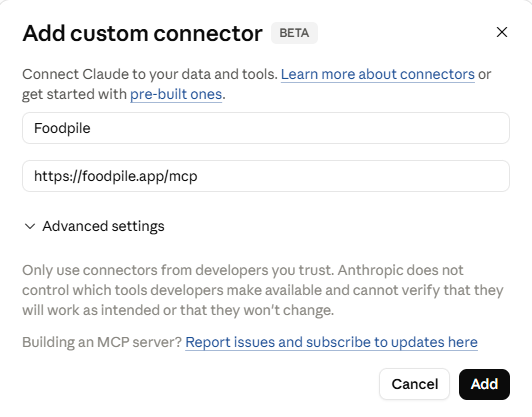
Desktop / CLI:
ChatGPT chatgpt.com ↗
Settings -> Connectors -> Add connector -> Connect via URL -> paste the URL above.
Mistral Le Chat chat.mistral.ai ↗
Connectors -> + Add Connector -> Custom MCP Connector -> paste the URL above.
When the assistant prompts you to sign in, use the same email address you used on the Foodpile home page.
Start logging
Once connected, just talk to your assistant. A few things to try:
- "Set my goal to lose 0.5 kg per week."
- "Log two eggs and toast."
- "I ran 5k."
- "I weigh 82 kg today."
- "How am I doing today?"
The assistant estimates calories and macros for you.
Troubleshooting
The assistant doesn't see my data
Sign in with the same email as your Foodpile account.
Foodpile tools don't appear
Remove and re-add the connector so it re-reads the tool list.
A meal landed on the wrong day or slot
Ask the assistant to check the current time first, then log; or fix it after the fact.
Is my data private?
Foodpile is a datastore, not an AI service.